Lights down. Curtain up.
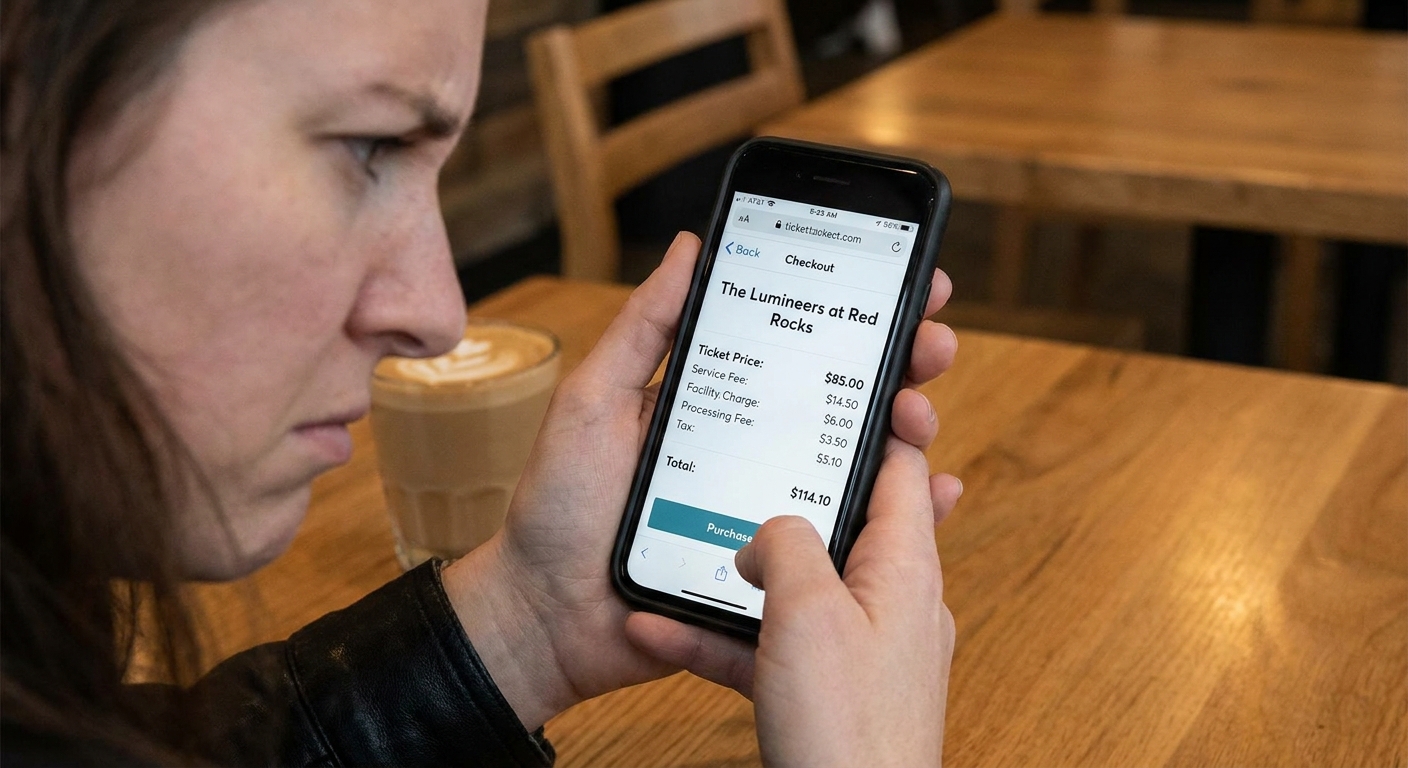
If you have ever clicked a tempting ticket price and then watched it grow at checkout, you already understand why all-in pricing is such a big deal. It is not a discount. It is a display rule: the first price you see is meant to be the real starting point for your budget.

All-in pricing, in plain terms
All-in pricing (also called upfront pricing) means the advertised ticket price already includes mandatory fees that you would otherwise only see once you get to checkout.
So if a listing shows $95 per ticket and it is truly all-in, that number should already reflect required add-ons like service, processing, and facility or venue fees. Taxes are handled differently depending on the jurisdiction and platform. Sometimes they are included in the displayed price, and sometimes they are added at checkout. The key promise of all-in pricing is that the required fees are not hiding offstage.
All-in vs fees at checkout
The more familiar model is a low base price shown upfront, followed by additional mandatory charges revealed later.
What it looks like
- Checkout-added model: You see $79 per ticket, click through seat selection, and at checkout the total becomes $104 per ticket after required fees are added.
- All-in model: You see $104 per ticket (or close to it) right on the listing page, before you commit time to the checkout process. If the seller adds a per-order charge (like an order processing or delivery fee), the final cart total can still shift, especially if you are buying one ticket versus several.
In other words, all-in pricing is mostly about reducing sticker shock and making it easier to compare options quickly across sections, dates, or even different sellers.
All-in vs dynamic pricing
All-in pricing can still exist in a world where ticket prices change with demand. These are separate concepts:
- All-in pricing tells you whether required fees are included in the displayed price.
- Dynamic pricing means the primary seller can raise or lower prices over time based on demand, day of week, seat location, and other factors.
- Resale pricing is set by a ticket holder or reseller, and can also rise or fall independently.
The important takeaway for shoppers is simple: all-in does not mean “price will not change.” It means the price you are currently seeing is not missing required fees.
Primary vs resale, quickly
A fast way to keep your bearings: primary tickets come from the official seller for that event, while resale tickets come from a ticket holder or reseller. Both types can be shown with all-in pricing, but the price setting is different (the primary seller sets it, or a reseller does), and the exact fee mix can differ by marketplace and delivery method.
Where you will spot “all-in”
Ticket sites do not always use the exact same wording, but you will often see hints like:
- “All-in pricing”
- “Upfront pricing”
- “Fees included”
- “Price includes fees” near filters or above the seat map
Some platforms show all-in prices by default, while others make you turn it on with a toggle or filter that switches between “base price” and “total price.” Also watch for inconsistency: some sites show all-in pricing in search results but revert to base prices on the seat map (or the other way around). That is why the toggle and the cart total matter.
How to confirm the total
1) Check the cart total before payment
Even with all-in pricing, confirm the total before you type in your card number. Do it after you have selected quantity and, if prompted, delivery method and any optional add-ons (like ticket protection). The cart page should show a total that aligns closely with what you expected based on the listing price.
2) Compare two seats in different sections
Pick two listings with very different displayed prices and click in far enough to see a total. In a true all-in display, the totals should track closely with the advertised numbers rather than jumping unexpectedly.
3) Watch for per-ticket vs per-order costs
Some costs show up as a single fee applied to the entire order, not each ticket. That can make an all-in per-ticket display look slightly different from the final order total when you buy multiple seats. The main point still stands: you should not have to guess whether required fees will balloon later.
4) “Mandatory” can depend on your choices
In some checkout flows, a fee might be unavoidable for the path you choose, like mobile delivery versus will call, or certain payment methods. If switching a delivery or payment option changes the fees, the all-in promise should still hold for the option you have selected.
Why it matters last-minute
Last-minute shopping is already a sprint. When you are toggling between dates, refreshing seat maps, or deciding whether to grab that lone aisle seat, all-in pricing saves time because you can compare options without doing mental math.
It also makes it easier to set a hard ceiling, like “I am not spending over $120 tonight,” and actually stick to it.
FAQ
Does all-in pricing mean the ticket is cheaper?
Not necessarily. It usually means the price is more transparent. A ticket displayed as $110 all-in might be the same ticket another view shows as $89 before required fees.
Can the final total still change even if it is all-in?
It can, depending on what gets added next. The point is that required fees are already included in the displayed price for the option you have selected. Optional add-ons you choose, delivery choices, per-order charges, and taxes (which vary by jurisdiction and platform) can still affect the total.
If I see “from $X,” is that all-in?
It depends on the site. “From” can mean it is the lowest available price in the venue at that moment, and that number may change as inventory shifts. Look for wording like “fees included” or an all-in toggle, then confirm by checking the cart total.
Is all-in pricing the same as face value?
No. All-in pricing is about whether the displayed price includes required fees. Face value is the original set price for a ticket. Separate from that, dynamic pricing and resale pricing can change what you pay.